

Description
|—————————————————————————-|
MWS Photo Print Studio
|—————————————————————————-|
This plugin integrates a complete photo printing order system into WooCommerce. It allows customers to select print orientation, choose print size, upload a photo, crop the image, select paper quality and finishing options, and place an order through the WooCommerce cart and checkout.
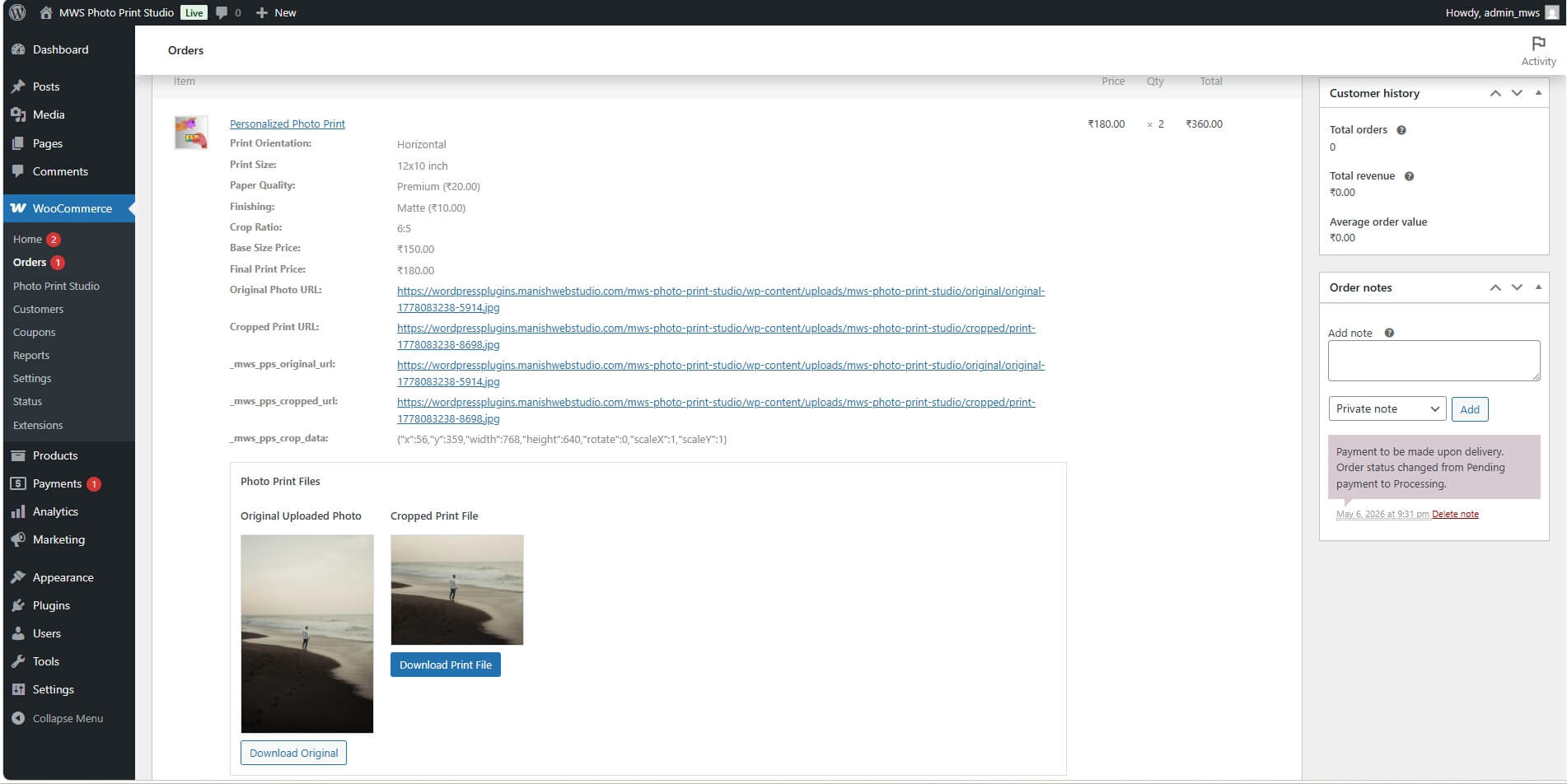
The plugin stores both the original uploaded image and the cropped print-ready image. Admins can view all selected print details, dimensions, pricing, and image previews directly inside WooCommerce order details.
|—————————————————————————-|
Features
|—————————————————————————-|
– WooCommerce product-level photo print upload option
– Horizontal, vertical, and square orientation selection
– Dynamic print size filtering based on selected orientation
– Customer image upload
– Image crop tool with preview
– Original image and cropped image storage
– Print size and dimension selection
– Paper quality options with extra pricing
– Finishing options with extra pricing
– Dynamic estimated price calculation
– WooCommerce cart and checkout integration
– Custom cart item pricing based on selected print options
– Admin order details with print information
– Original image preview and download link
– Cropped print-ready image preview and download link
– Upload size validation with clear error messages
– JPG, PNG, and WEBP support
– Clean frontend user interface
|—————————————————————————-|
Installation
|—————————————————————————-|
1. Download the plugin ZIP file.
2. Go to WordPress Admin > Plugins > Add New > Upload Plugin.
3. Upload the plugin ZIP file.
4. Click Install Now.
5. Activate the plugin from the Plugins menu in WordPress.
6. Make sure WooCommerce is installed and activated.
|—————————————————————————-|
Usage
|—————————————————————————-|
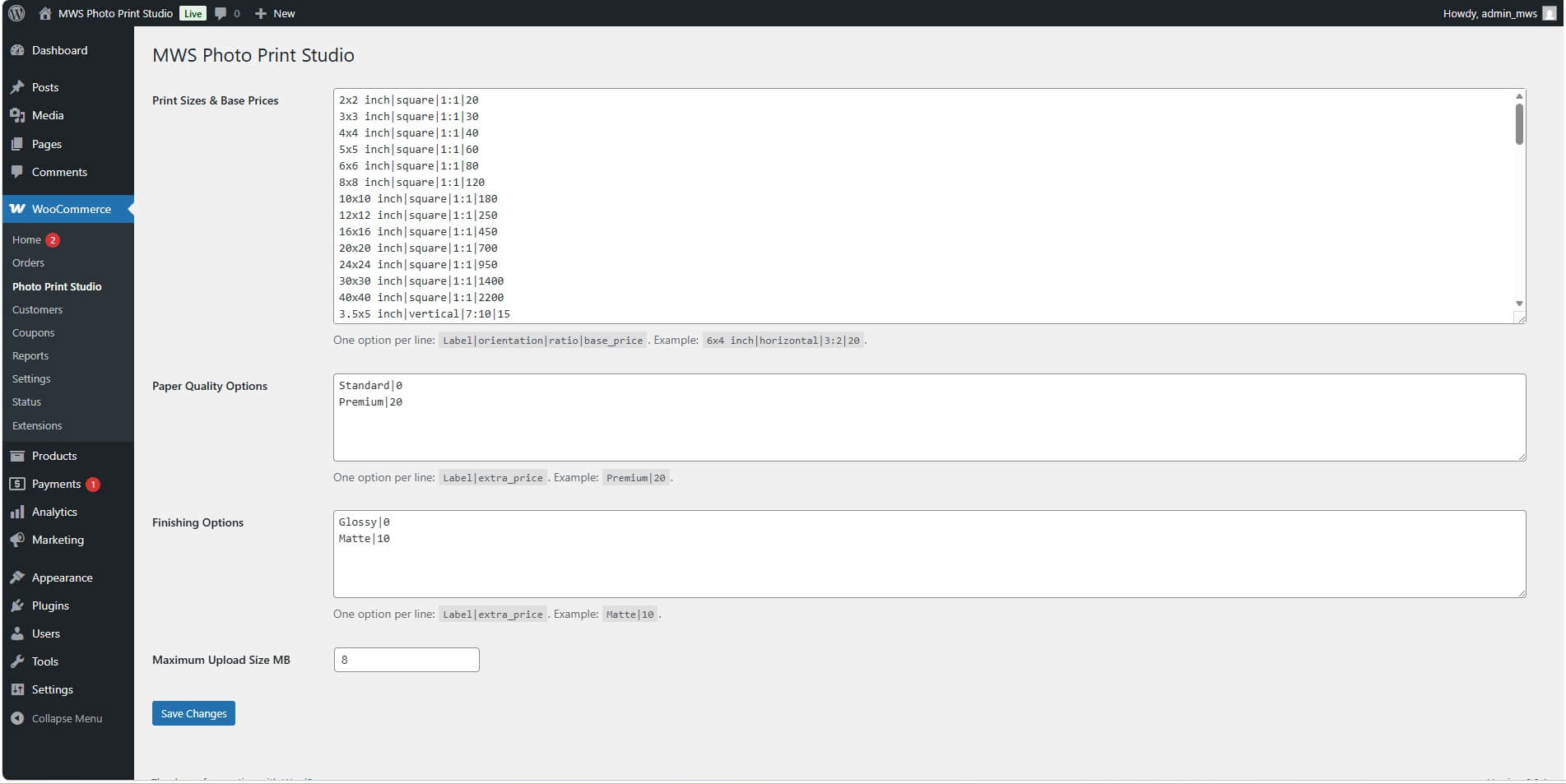
1. Go to WordPress Admin > WooCommerce > Settings > Photo Print Studio.
2. Configure print sizes, orientation, paper quality, finishing options, and upload limit.
3. Go to Products > Add New or edit an existing WooCommerce product.
4. In the Product Data section, enable Photo Print Upload.
5. Save or update the product.
6. Visit the product page on the frontend.
7. Select orientation, print size, paper quality, and finishing.
8. Upload an image and crop it.
9. Add the product to the cart and complete checkout.
10. Admin can view uploaded images and selected print details from WooCommerce > Orders > View Order.
|—————————————————————————-|
Frequently Asked Questions (FAQ)
|—————————————————————————-|
Q: Does this plugin require WooCommerce?
A: Yes, WooCommerce is required because the plugin uses WooCommerce products, cart, checkout, and order management.
Q: Can customers crop images before ordering?
A: Yes, customers can upload an image, crop it, preview the final print area, and then add it to the cart.
Q: Can the admin see the uploaded photo?
A: Yes, the admin can see the original uploaded photo and the cropped print-ready image inside the WooCommerce order details.
Q: Can the admin download the cropped image?
A: Yes, the plugin provides download links for both the original and cropped images.
Q: Can I set different prices for different print sizes?
A: Yes, each print size can have its own base price.
Q: Can I add extra charges for premium paper or matte finishing?
A: Yes, paper quality and finishing options can have additional prices.
Q: Should I create WooCommerce variations for every size?
A: No, this plugin is designed to avoid large variation sets. Print size, orientation, paper quality, and finishing are handled by the plugin.
Q: Which image formats are supported?
A: The plugin supports JPG, PNG, and WEBP images.
Q: Can I control maximum upload size?
A: Yes, the plugin displays the allowed maximum upload size and shows a clear error if the uploaded image is too large.
Q: Can this plugin be used for canvas or poster printing?
A: Yes, it can be used for photo prints, canvas prints, poster prints, frame prints, and similar printing services.
|—————————————————————————-|
Changelog
|—————————————————————————-|
Version 1.8 (Stable Release) 06-05-2026
– Hidden default WooCommerce price for enabled photo-print products
– Added starting price display
– Made enabled photo-print products purchasable even when regular price is empty
– Added fallback zero price only for dynamic pricing workflow
– Updated readme pattern
Version 1.7
– Improved frontend UI
– Fixed HTML tags appearing in print size dropdown
– Improved price display
– Added proper frontend CSS and JavaScript assets
Version 1.6
– Added paper quality options
– Added finishing options
– Added extra price calculation
– Added dynamic final price display
– Added cart and order metadata for selected options
Version 1.5
– Fixed print size list formatting issue
– Improved default size loading
Version 1.4
– Added common print sizes for horizontal, vertical, and square formats
– Added photo print, poster, and paper dimensions
Version 1.3
– Added upload size notice
– Added better upload error messages
– Added server-side upload validation
Version 1.2
– Improved crop upload saving
– Added orientation-based size filtering
Version 1.1
– Improved cropped image saving before adding to cart
– Added original and cropped image handling
Version 1.0
– Initial plugin release
– Added WooCommerce product upload option
– Added orientation, print size, image upload, crop preview, cart, and order details support
|—————————————————————————-|
License
|—————————————————————————-|
This plugin is under a Proprietary License. Redistribution, modification, or resale is prohibited without permission from the author.
The license is lifetime, with no yearly or monthly renewal required.
Usage is permitted on unlimited websites with a valid purchase.
|—————————————————————————-|
Support
|—————————————————————————-|
For support, visit https://manishwebstudio.com/ or contact the author directly at manishwebstudio@gmail.com
Admin Panel
Orders
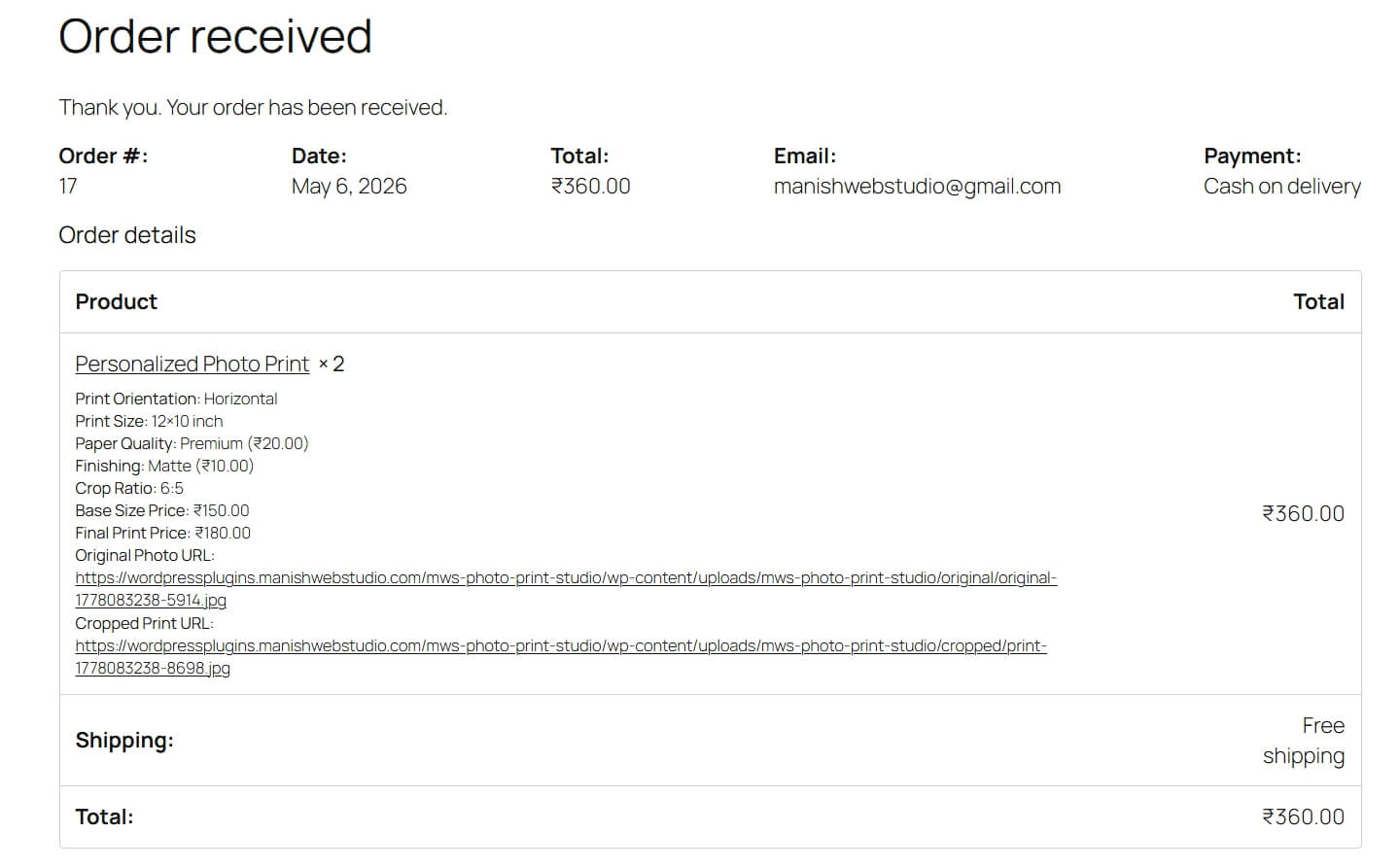
Customer Account
Demo Link: MWS Photo Print Studio – No UI, Manish has created me only for functionality testing




Mohammad Usman –
I was searching for a WooCommerce plugin where customers could upload and crop photos before ordering prints, and this plugin solved it perfectly. The orientation-based size filtering and dynamic pricing are very useful for our photo studio business.